



Description
Download Active Disk Editor – disk editor, data recovery, partition editor, file system analysis, low-level disk access
Overview
Active Disk Editor delivers a specialized mobile environment for users seeking detailed control over storage media at a low-level. Designed for advanced users and technical professionals, the app enables comprehensive inspection and manipulation of hard drives, partitions, and other data storage devices directly from Android devices. Its primary purpose is to provide real-time visibility into disk structures, making it valuable for tasks such as data recovery, file system analysis, and partition troubleshooting. The app is particularly useful in scenarios where standard file managers fail to access corrupted or non-standard storage configurations.
Target users include IT specialists, data recovery technicians, system administrators, and advanced hobbyists who require granular access to disk contents. The app supports low-level disk access, allowing users to examine raw binary data and interpret it through customizable templates. This functionality is essential when diagnosing disk corruption, recovering lost partitions, or analyzing file system inconsistencies. Although the developer did not provide additional technical details about the app’s origin or development background, its focus on precision and data integrity suggests a targeted approach to mobile-based disk management.
Real-world use cases include verifying disk structure changes after a repair operation, inspecting exFAT-formatted USB drives for hidden data, or comparing two disk images to identify discrepancies. In the broader app ecosystem, Active Disk Editor fills a niche gap by bringing advanced disk editing capabilities to mobile platforms, where such tools are otherwise limited. Its release marks a step forward in mobile utility for technical users.
Key Features & Functionality
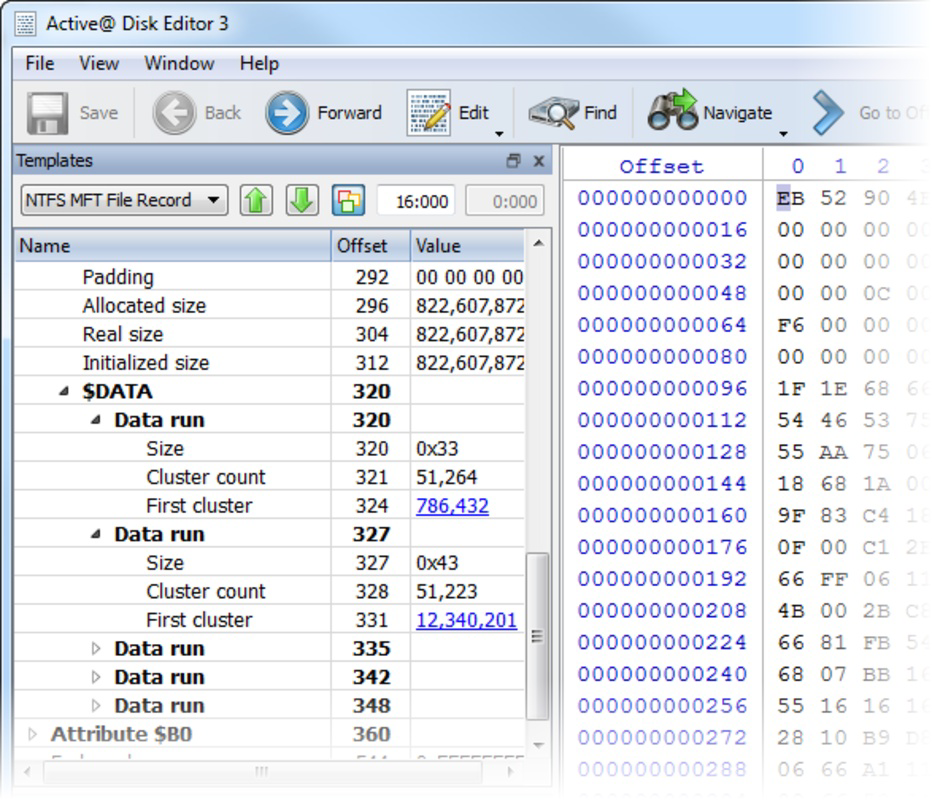
- Enhanced Template View: Users can customize how disk data is displayed using predefined or user-defined templates. This feature simplifies the interpretation of complex data structures by organizing raw binary into readable formats, such as headers, metadata, or sector layouts. It’s especially useful when analyzing file system structures or identifying specific data blocks.
- Side-by-Side Compare and Edit: This functionality enables direct comparison between two disk sections or two disk images. Users can edit values in real time, which is critical for correcting corrupted entries or validating changes before applying them. The synchronized view ensures accuracy during modifications.
- Extensive exFAT Support: The app provides full compatibility with the exFAT file system, a standard on modern USB drives, SD cards, and external storage devices. This support allows seamless navigation and editing of data across different platforms, improving cross-device data management.
- Fast Navigation Points: Users can jump to significant disk locations—such as boot sectors, partition tables, or file system roots—using predefined or user-defined bookmarks. This feature significantly reduces the time required to locate critical data within large storage volumes.
- Data Inspector: This tool allows users to examine individual data values at the byte level, offering insights into how data is stored and structured. It supports real-time analysis, enabling users to trace data flow, detect anomalies, or recover fragmented information.
Each feature is designed with precision in mind. For example, the side-by-side compare function can be used to verify if a disk repair tool successfully restored a partition table. The Data Inspector can help identify whether a corrupted file header is due to a write error or intentional modification. These tools collectively empower users to make informed decisions during data recovery and disk diagnostics.
Interface, UX & Performance
Active Disk Editor features a streamlined, text-based interface optimized for clarity and functionality rather than visual flair. The layout is divided into dual panes: one for binary data and another for text interpretation, enabling simultaneous viewing of raw bytes and their human-readable equivalents. This dual-display setup supports efficient analysis without context switching.
Navigating through disk contents is intuitive, with clearly labeled sections and responsive controls. Users can scroll through data, set bookmarks, and apply templates with minimal input. The app maintains consistent responsiveness across various Android device categories, though the developer did not list formal performance metrics. Although the app is lightweight at 4.5 MB, its performance may vary depending on the device’s processing power and available RAM.
Stability appears to be a priority, as the app supports direct data manipulation without immediate crashes or data loss during editing. However, no user reports or crash statistics were provided. The lack of visual feedback during edits suggests that the app is designed for experienced users who understand the risks of low-level modifications. Overall, the UX is functional and purpose-driven, catering to technical users rather than general audiences.
Platform Compatibility & Technical Requirements
Active Disk Editor is available exclusively on the Android platform. The app is compatible with Android devices running the version specified in the release details. The file size is 4.5 MB, indicating a lightweight footprint that minimizes storage impact.
Specific requirements such as minimum OS version, processor architecture, or hardware compatibility were not listed by the developer. As a result, compatibility information was not fully disclosed. Users should ensure their device meets general Android standards for running utility applications. The app does not require root access, but it may need elevated permissions to access storage devices, depending on the device’s security model.
Pros and Cons
- Provides low-level access to disk data on mobile devices
- Supports exFAT, making it suitable for modern storage media
- Includes powerful tools like side-by-side comparison and Data Inspector
- Lightweight at only 4.5 MB
- Free to download and use
- Interface is text-heavy and may not appeal to non-technical users
- No official documentation or in-app tutorials provided
- Specific system requirements were not disclosed
- App lacks visual feedback during editing operations
- Not available on iOS or other platforms
FAQ
Is Active Disk Editor safe to use on my device?
Yes, the app is designed to operate safely within the Android security model. However, due to its low-level access capabilities, users should exercise caution when editing disk data to avoid unintended data loss.
Can I use Active Disk Editor without root access?
Yes, the app does not require root privileges to function. However, full access to all storage devices may depend on the device’s security settings and Android version.
Is Active Disk Editor available on iOS?
Currently, the app is only available for Android. There is no official iOS version released.
How often is Active Disk Editor updated?
The developer has not specified a release schedule. The latest version available is 1.0.0, released on January 30, 2025.
Can I recover deleted files using Active Disk Editor?
While the app allows deep inspection of disk contents, it does not include automated file recovery features. Users can manually locate and extract data if it remains intact, but recovery is not guaranteed.
Final Thoughts
Active Disk Editor stands out as a rare mobile tool offering true low-level disk access and advanced data analysis capabilities. It is not a casual utility but a precision instrument tailored for IT professionals, data recovery experts, and technically inclined users who need to inspect or modify storage media directly. The combination of exFAT support, side-by-side editing, and a customizable template system makes it a valuable addition to any mobile toolkit for system diagnostics.
While the interface may feel stark to non-technical users, its focus on functionality over form is appropriate for its intended audience. The app’s free price point and small size further enhance its accessibility. For those working with external drives, corrupted partitions, or complex file systems, Active Disk Editor delivers tangible value.
Download Active Disk Editor now
Guides & Tutorials for Active Disk Editor
How to install Active Disk Editor
- Click the Preview / Download button above.
- Once redirected, accept the terms and click Install.
- Wait for the Active Disk Editor download to finish on your device.
How to use Active Disk Editor
This software is primarily used for its core features described above. Open the app after installation to explore its capabilities.
User Reviews for Active Disk Editor 0
No reviews found


